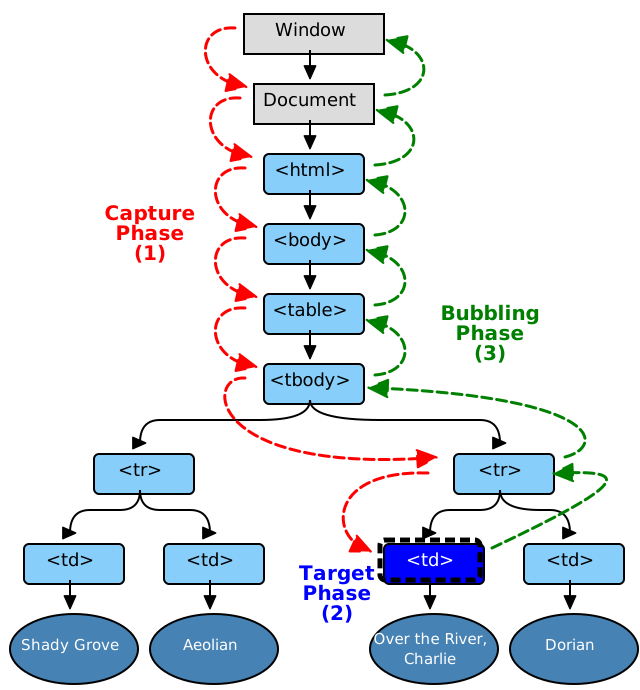
Event bubbling is a term you might have come across on your JavaScript travels. It relates to the order in which event handlers are called when one element is nested inside a second element, and both elements have registered a listener for the same event (a click, for example).
But event bubbling is only one piece of the puzzle. It is often mentioned in conjunction with event capturing and event propagation. And a firm understanding of all three concepts is essential for working with events in JavaScript — for example if you wish to implement
the event delegation pattern.
In this post I will explain each of these terms and demonstrate how they fit together. I will also show you how a basic understanding of JavaScript event flow can give you fine-grained control over your application. Please note that this is not a primer on events, thus a familiarity with the topic is assumed. If you’d like to learn more about events in general, why not check out our book:
JavaScript: Novice to Ninja.
What is the Event Propagation?
Let’s start with event propagation. This is the blanket term for both event bubbling and event capturing. Consider the typical markup to build a list of linked images, for a thumbnails gallery for example:
<ul>
    <li><a href="..."><img src="..." alt=""></a>
    <li><a href="..."><img src="..." alt=""></a>
    ...
    <li><a href="..."><img src="..." alt=""></a>
</ul>
A click on an image does not only generate a click event for the corresponding IMG element, but also for the parent A, for the grandfather LI and so on, going all the way up through all the element’s ancestors, before terminating at the windowobject.
In DOM terminology, the image is the event target, the innermost element over which the click originated. The event target, plus its ancestors, from its parent up through to the window object, form a branch in the DOM tree. For example, in the image gallery, this branch will be composed of the nodes: IMG, A, LI, UL, BODY, HTML, document, window.
Note that window is not actually a DOM node but it implements the EventTarget interface, so, for simplicity, we are handling it like it was the parent node of the document object.
This branch is important because it is the path along which the events propagate (or flow). This propagation is the process of calling all the listeners for the given event type, attached to the nodes on the branch. Each listener will be called with an event object that gathers information relevant to the event (more on this later).
Remember that several listeners can be registered on a node for the same event type. When the propagation reaches one such node, listeners are invoked in the order of their registration.
It should also be noted that the branch determination is static, that is, it is established at the initial dispatch of the event. Tree modifications occurring during event processing will be ignored.
The propagation is bidirectional, from the window to the event target and back. This propagation can be divided into three phases:
- From the window to the event target parent: this is the capture phase
- The event target itself: this is the target phase
- From the event target parent back to the window: the bubble phase
What differentiates these phases is the type of listeners that are called.
The Event Capture Phase
In this phase only the
capturer listeners are called, namely, those listeners that were registered using a value of
true for the third parameter of
addEventListener:
el.addEventListener('click', listener, true)
If this parameter is omitted, its default value is false and the listener is not a capturer.
So, during this phase, only the capturers found on the path from the window to the event target parent are called.
The Event Target Phase
In this phase all the listeners registered on the event target will be invoked, regardless of the value of their capture flag.
The Event Bubbling Phase
During the event bubbling phase only the non-capturers will be called. That is, only the listeners registered with a value of false for the third parameter of addEventListener():
el.addEventListener('click', listener, false)
el.addEventListener('click', listener)
Note that while all events flow down to the event target with the capture phase, focus, blur, load and some others, don’t bubble up. That is, their travel stops after the target phase.
Therefore, at the end of the propagation, each listener on the branch has been called exactly once.
Event bubbling does not take place for every kind of event. During propagation, it is possible for a listener to know if an event bubbles by reading the .bubbles Boolean property of the event object.
I already mentioned the .bubbles property of the event object. There are a number of other properties provided by this object that are available to the listeners to access information relative to the propagation.
- e.target references the event target.
- e.currentTarget is the node on which the running listener was registered on. This is the same value of the listener invocation context, i.e, the value referenced by the
this keyword.
- We can even find out the current phase with e.eventPhase. It is an integer that refers to one the three
Event constructor constants CAPTURING_PHASE, BUBBLING_PHASE and AT_TARGET.
Putting it into Practice
Let’s see the above concepts into practice. In the following pen, there are five nested square boxes, named b0…b4. Initially, only the outer box b0 is visible; the inner ones will show when the mouse pointer hovers over them. When we click on a box, a log of the propagation flow is shown on the table to the right.
It is even possible to click outside the boxes: in this case, the event target will be the BODY or the HTML element, depending on the click screen location.
Stopping Propagation
The event propagation can be stopped in any listener by invoking the
stopPropagation method of the event object. This means that all the listeners registered on the nodes on the propagation path that follow the current target will not be called. Instead, all the other remaining listeners attached on the current target will still receive the event.
We can check this behavior with a
simple fork of the previous demo, just inserting a call to
stopPropagation() in one of the listeners. Here we have prepended this new listener as a capturer to the list of callbacks registered on
window:
window.addEventListener('click', e => { e.stopPropagation(); }, true);
window.addEventListener('click', listener('c1'), true);
window.addEventListener('click', listener('c2'), true);
window.addEventListener('click', listener('b1'));
window.addEventListener('click', listener('b2'));
This way, whatever box is clicked, the propagation halts early, reaching only the capturer listeners on window.
window.addEventListener('click', e => { e.stopImmediatePropagation(); }, true);
window.addEventListener('click', listener('c1'), true);
window.addEventListener('click', listener('c2'), true);
window.addEventListener('click', listener('b1'));
window.addEventListener('click', listener('b2'));
Now, nothing is output in the log table, neither the c1 and c2 window capturers rows, because the propagation stops after the execution of the new listener.
Event Cancellation
Some events are associated with a default action that the browser executes at the end of the propagation. For instance, the click on a link element or the click on a form submit button causes the browser to navigate to a new page, or submit the form respectively.
It is possible to avoid the execution of such default actions with the event cancellation, by calling yet another method of the event object,
e.preventDefault, in a listener.
Conclusion
With that, I hope to have shown you how event bubbling and event capturing work in JavaScript. If you have any questions or comments, I’d be glad to hear them in the discussion below.
<div id="dvid" >
<b>div element</b>
<p id="pid"><span id="spnid"><b>this is span</b></span> <b>this is paragraph</b>></p>
</div>
<script type="text/javascript">
var p = document.getElementById("pid");
var d = document.getElementById("dvid");
var s = document.getElementById("spnid");
Event Bubbling
p.addEventListener("click", function () {
alert("p clicked");
//p.innerHTML = "event is clicked";
});
d.addEventListener("click", function () {
alert("div clicked");
//p.innerHTML = "event is clicked";
});
s.addEventListener("click", function () {
alert("span clicked");
//p.innerHTML = "event is clicked";
});
Event capture
p.addEventListener("click", function () {
alert("p clicked");
//p.innerHTML = "event is clicked";
}, true);
d.addEventListener("click", function () {
alert("div clicked");
//p.innerHTML = "event is clicked";
}, true);
s.addEventListener("click", function () {
alert("span clicked");
//p.innerHTML = "event is clicked";
},true);
</script>
References