Thursday, 4 May 2017

Static Constructor in C# and their Usages

C# supports two types of constructor, a class constructor (static constructor) and an instance constructor (non-static constructor).
Static constructor is used to initialize static data members as soon as the class is referenced first time, whereas an instance constructor is used to create an instance of that class with <new> keyword. A static constructor does not take access modifiers or have parameters and can't access any non-static data member of a class.
Since static constructor is a class constructor, they are guaranteed to be called as soon as we refer to that class or by creating an instance of that class.
You may say, why not initialize static data members where we declare them in the code. Like this :
private static int id = 10;private static string name = "jack";
Static data members can certainly be initialized at the time of their declaration but there are times when value of one static member may depend upon the value of another static member. In such cases we definitely need some mechanism to handle conditional initialization of static members. To handlesuch situation, C# provides static constructor.
Let me explain you with examples :
//File Name : Test.csusing System;namespace Constructor
{
class Test
{
//Declaration and initialization of static data member private static int id = 5;public static int Id
{
get{
return id;
}
}public static void print()
{
Console.WriteLine("Test.id = " + id);
}
static void Main(string[] args)
{
//Print the value of id Test.print();
}
}
}
In the above example, static data member <id> is declared and initialized in same line. So if you compile and run this program your output would look similar to this :
Test.id = 5
Lets create one more class similar to class Test but this time the value of its static data member would depend on the value of static data member <id> of class Test.id.
//File Name : Test1.csusing System;namespace Constructor
{
class Test1
{
private static int id ;//Static constructor, value of data member id is set conditionally here. //This type of initialization is not possible at the time of declaration.static Test1()
{
if( Test.Id < 10 )
{
id = 20;
}
else{
id = 100; 
}
Console.WriteLine("Static<Class> Constructor for Class Test1 Called..");
}
public static void print()
{
Console.WriteLine("Test1.id = " + id);
}
static void Main(string[] args)
{
//Print the value of id Test1.print();
}
}
}
As you can see in the above static constructor, static data member <id> is initialized conditionally. This type of initialization is not possible at the time of declaration. This is where static constructor comes in picture. So if you compile and run this program your output would look similar to this :
Static<Class> Constructor for Class Test1 Called..
id = 20
Since <id> in class Test was initialized with a value of 5, therefore <id> in class Test1 got initialized to a value of 20.
Some important point regarding static constructor from C# Language Specification and C# Programmer's Reference :
1) The static constructor for a class executes before any instance of the class is created.
2) The static constructor for a class executes before any of the static members for the class are referenced.
3) The static constructor for a class executes after the static field initializers (if any) for the class.
4) The static constructor for a class executes at most one time during a single program instantiation
5) A static constructor does not take access modifiers or have parameters.
6) A static constructor is called automatically to initialize the class before the first instance is created or any static members are referenced. 
7) A static constructor cannot be called directly.
8) The user has no control on when the static constructor is executed in the program. 
9) A typical use of static constructors is when the class is using a log file and the constructor is used to write entries to this file.
Hopefully, this would clear the confusion some of developers have about static constructor.

Disclaimer: The above program is intended solely for learning purpose. Author will not be held responsible for any failure or damages caused due to any other usage.

Monday, 17 April 2017

Routing in ASP.NET Web API

If you are familiar with ASP.NET MVC, Web API routing is very similar to MVC routing. The main difference is that Web API uses the HTTP method, not the URI path, to select the action. You can also use MVC-style routing in Web API. This article does not assume any knowledge of ASP.NET MVC.


Routing Tables

In ASP.NET Web API, a controller is a class that handles HTTP requests. The public methods of the controller are called action methods or simply actions. When the Web API framework receives a request, it routes the request to an action.
To determine which action to invoke, the framework uses a routing table. The Visual Studio project template for Web API creates a default route:
Copy
C#
routes.MapHttpRoute(
    name: "API Default",
    routeTemplate: "api/{controller}/{id}",
    defaults: new { id = RouteParameter.Optional }
);
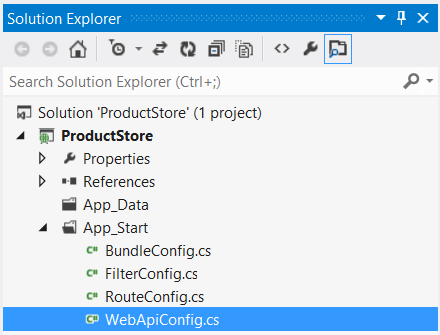
This route is defined in the WebApiConfig.cs file, which is placed in the App_Start directory:
For more information aboout the WebApiConfig class, see Configuring ASP.NET Web API.1
If you self-host Web API, you must set the routing table directly on the HttpSelfHostConfiguration object. For more information, see Self-Host a Web API.
Each entry in the routing table contains a route template. The default route template for Web API is "api/{controller}/{id}". In this template, "api" is a literal path segment, and {controller} and {id} are placeholder variables.
When the Web API framework receives an HTTP request, it tries to match the URI against one of the route templates in the routing table. If no route matches, the client receives a 404 error. For example, the following URIs match the default route:
  • /api/contacts
  • /api/contacts/1
  • /api/products/gizmo1
However, the following URI does not match, because it lacks the "api" segment:
  • /contacts/1
Note
The reason for using "api" in the route is to avoid collisions with ASP.NET MVC routing. That way, you can have "/contacts" go to an MVC controller, and "/api/contacts" go to a Web API controller. Of course, if you don't like this convention, you can change the default route table.
Once a matching route is found, Web API selects the controller and the action:
  • To find the controller, Web API adds "Controller" to the value of the {controller} variable.
  • To find the action, Web API looks at the HTTP method, and then looks for an action whose name begins with that HTTP method name. For example, with a GET request, Web API looks for an action that starts with "Get...", such as "GetContact" or "GetAllContacts". This convention applies only to GET, POST, PUT, and DELETE methods. You can enable other HTTP methods by using attributes on your controller. We'll see an example of that later.
  • Other placeholder variables in the route template, such as {id}, are mapped to action parameters.
Let's look at an example. Suppose that you define the following controller:
Copy
C#
public class ProductsController : ApiController
{
    public void GetAllProducts() { }
    public IEnumerable<Product> GetProductById(int id) { }
    public HttpResponseMessage DeleteProduct(int id){ }
}
Here are some possible HTTP requests, along with the action that gets invoked for each:1
HTTP MethodURI PathActionParameter
GETapi/productsGetAllProducts(none)
GETapi/products/4GetProductById4
DELETEapi/products/4DeleteProduct4
POSTapi/products(no match)
Notice that the {id} segment of the URI, if present, is mapped to the id parameter of the action. In this example, the controller defines two GET methods, one with an id parameter and one with no parameters.
Also, note that the POST request will fail, because the controller does not define a "Post..." method.

Routing Variations

The previous section described the basic routing mechanism for ASP.NET Web API. This section describes some variations.

HTTP Methods

Instead of using the naming convention for HTTP methods, you can explicitly specify the HTTP method for an action by decorating the action method with the HttpGet, HttpPut, HttpPost, or HttpDelete attribute.
In the following example, the FindProduct method is mapped to GET requests:
Copy
C#
public class ProductsController : ApiController
{
    [HttpGet]
    public Product FindProduct(id) {}
}
To allow multiple HTTP methods for an action, or to allow HTTP methods other than GET, PUT, POST, and DELETE, use the AcceptVerbs attribute, which takes a list of HTTP methods.
Copy
C#
public class ProductsController : ApiController
{
    [AcceptVerbs("GET", "HEAD")]
    public Product FindProduct(id) { }

    // WebDAV method
    [AcceptVerbs("MKCOL")]
    public void MakeCollection() { }
}

Routing by Action Name

With the default routing template, Web API uses the HTTP method to select the action. However, you can also create a route where the action name is included in the URI:
Copy
C#
routes.MapHttpRoute(
    name: "ActionApi",
    routeTemplate: "api/{controller}/{action}/{id}",
    defaults: new { id = RouteParameter.Optional }
);
In this route template, the {action} parameter names the action method on the controller. With this style of routing, use attributes to specify the allowed HTTP methods. For example, suppose your controller has the following method:
Copy
C#
public class ProductsController : ApiController
{
    [HttpGet]
    public string Details(int id);
}
In this case, a GET request for "api/products/details/1" would map to the Details method. This style of routing is similar to ASP.NET MVC, and may be appropriate for an RPC-style API.
You can override the action name by using the ActionName attribute. In the following example, there are two actions that map to "api/products/thumbnail/id. One supports GET and the other supports POST:
Copy
C#
public class ProductsController : ApiController
{
    [HttpGet]
    [ActionName("Thumbnail")]
    public HttpResponseMessage GetThumbnailImage(int id);

    [HttpPost]
    [ActionName("Thumbnail")]
    public void AddThumbnailImage(int id);
}

Non-Actions

To prevent a method from getting invoked as an action, use the NonAction attribute. This signals to the framework that the method is not an action, even if it would otherwise match the routing rules.
Copy
C#
// Not an action method.
[NonAction]  
public string GetPrivateData() { ... }

Further Reading

This topic provided a high-level view of routing. For more detail, see Routing and Action Selection, which describes exactly how the framework matches a URI to a route, selects a controller, and then selects the action to invoke.

Tuesday, 10 January 2017

difference between Convert.ToInt32 and Int32.Parse?

Int32.parse(string)

Int32.Parse(string s) method converts the string representation of a number to its 32-bit signed integer equivalent.
  • When s is a null reference, it will throw ArgumentNullException.
  • If s is other than integer value, it will throw FormatException.
  • When s represents a number less than MinValue or greater than MaxValue, it will throw OverflowException.
For example:
string s1 = "1234"; 
string s2 = "1234.65"; 
string s3 = null; 
string s4 = "123456789123456789123456789123456789123456789"; 

int result; 
bool success; 

result = Int32.Parse(s1); //-- 1234 
result = Int32.Parse(s2); //-- FormatException 
result = Int32.Parse(s3); //-- ArgumentNullException 
result = Int32.Parse(s4); //-- OverflowException 

Convert.ToInt32(string)

Convert.ToInt32(string s) method converts the specified string representation of 32-bit signed integer equivalent. This calls in turn Int32.Parse() method.
  • When s is a null reference, it will return 0 rather than throw ArgumentNullException.
  • If s is other than integer value, it will throw FormatException.
  • When s represents a number less than MinValue or greater than MaxValue, it will throw OverflowException.
For example:
result = Convert.ToInt32(s1); //-- 1234 
result = Convert.ToInt32(s2); //-- FormatException 
result = Convert.ToInt32(s3); //-- 0 
result = Convert.ToInt32(s4); //-- OverflowException 

Int32.TryParse(string, out int)

Int32.Parse(string, out int) method converts the specified string representation of 32-bit signed integer equivalent to out variable, and returns true if it is parsed successfully, false otherwise. This method is available in C# 2.0.
  • When s is a null reference, it will return 0 rather than throw ArgumentNullException.
  • If s is other than an integer value, the out variable will have 0 rather than FormatException.
  • When s represents a number less than MinValue or greater than MaxValue, the out variable will have 0 rather than OverflowException.
For Example :
success = Int32.TryParse(s1, out result); //-- success => true; result => 1234 
success = Int32.TryParse(s2, out result); //-- success => false; result => 0 
success = Int32.TryParse(s3, out result); //-- success => false; result => 0 
success = Int32.TryParse(s4, out result); //-- success => false; result => 0 

Conclusion

Convert.ToInt32() is better than Int32.Parse() since it returns 0 rather than an exception. But again, according to the requirement, this can be used. TryParse will be the best since it always handles exceptions by itself.

Recent Post

how to control duplicate order