Wednesday, 28 December 2022

Value Type and Reference Type

In C#, these data types are categorized based on how they store their value in the memory. C# includes the following categories of data types:

  1. Value type
  2. Reference type
  3. Pointer type

Value Type

A data type is a value type if it holds a data value within its own memory space. It means the variables of these data types directly contain values.

tipAll the value types derive from System.ValueType, which in-turn, derives from System.Object.

For example, consider integer variable int i = 100;

The system stores 100 in the memory space allocated for the variable i. The following image illustrates how 100 is stored at some hypothetical location in the memory (0x239110) for 'i':
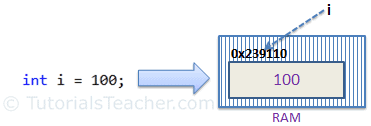
Memory Allocation of Value Type Variable

The following data types are all of value type:

  • bool
  • byte
  • char
  • decimal
  • double
  • enum
  • float
  • int
  • long
  • sbyte
  • short
  • struct
  • uint
  • ulong
  • ushort
5.7M
54
Angular Unit Testing Services - The easy way to create automated unit tests for services, in minutes

Passing Value Type Variables

When you pass a value-type variable from one method to another, the system creates a separate copy of a variable in another method. If value got changed in the one method, it wouldn't affect the variable in another method.

Example: Passing Value Type Variables
static void ChangeValue(int x)
{
    x =  200;

    Console.WriteLine(x);
}

static void Main(string[] args)
{
    int i = 100;

    Console.WriteLine(i);
    
    ChangeValue(i);
    
    Console.WriteLine(i);
}
Output:

100
200
100

In the above example, variable i in the Main() method remains unchanged even after we pass it to the ChangeValue() method and change it's value there.

Reference Type

Unlike value types, a reference type doesn't store its value directly. Instead, it stores the address where the value is being stored. In other words, a reference type contains a pointer to another memory location that holds the data.

For example, consider the following string variable:

string s = "Hello World!!";

The following image shows how the system allocates the memory for the above string variable.
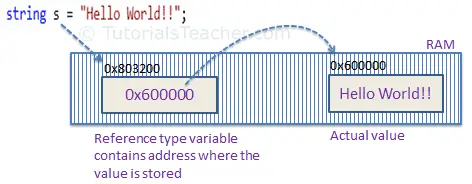
Memory Allocation of Reference Type Variable

As you can see in the above image, the system selects a random location in memory (0x803200) for the variable s. The value of a variable s is 0x600000, which is the memory address of the actual data value. Thus, reference type stores the address of the location where the actual value is stored instead of the value itself.

The followings are reference type data types:

  • String
  • Arrays (even if their elements are value types)
  • Class
  • Delegate

Passing Reference Type Variables

When you pass a reference type variable from one method to another, it doesn't create a new copy; instead, it passes the variable's address. So, If we change the value of a variable in a method, it will also be reflected in the calling method.

Example: Passing Reference Type Variable
static void ChangeReferenceType(Student std2)
{
    std2.StudentName = "Steve";
}

static void Main(string[] args)
{
    Student std1 = new Student();
    std1.StudentName = "Bill";
    
    ChangeReferenceType(std1);

    Console.WriteLine(std1.StudentName);
}
Output:

Steve

In the above example, we pass the Student object std1 to the ChangeReferenceType() method. Here, it actually pass the memory address of std1. Thus, when the ChangeReferenceType() method changes StudentName, it is actually changing StudentName of std1 object, because std1 and std2 are both pointing to the same address in memory.

String is a reference type, but it is immutable. It means once we assigned a value, it cannot be changed. If we change a string value, then the compiler creates a new string object in the memory and point a variable to the new memory location. So, passing a string value to a function will create a new variable in the memory, and any change in the value in the function will not be reflected in the original value, as shown below.

Example: Passing String
static void ChangeReferenceType(string name)
{
    name = "Steve";
}

static void Main(string[] args)
{
    string name = "Bill";
    
    ChangeReferenceType(name);

    Console.WriteLine(name);
}
Output:

Bill

Null

The default value of a reference type variable is null when they are not initialized. Null means not refering to any object.
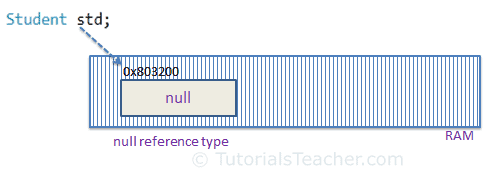
Null Reference Type

A value type variable cannot be null because it holds value, not a memory address. C# 2.0 introduced nullable types, using which you can assign null to a value type variable or declare a value type variable without assigning a value to it.

Monday, 26 December 2022

Difference between Where and Having Clause in SQL

 1. WHERE Clause: 

WHERE Clause is used to filter the records from the table or used while joining more than one table.Only those records will be extracted who are satisfying the specified condition in WHERE clause. It can be used with SELECT, UPDATE, DELETE statements. 

Let us consider below table “Student” 

Roll_no       S_Name      Age

1                a             17

2                b             20

3                c             21

4                d             18

5                e             20

6                f             17

7                g             21

8                h             17 

Consider the Query: 

SELECT S_Name, Age FROM Student 
WHERE Age >=18

OUTPUT of above query is : 

 S_Name      Age

b             20             

c             21             

d             18             

e             20             

g             21             

2. HAVING Clause: 
HAVING Clause is used to filter the records from the groups based on the given condition in the HAVING Clause. Those groups who will satisfy the given condition will appear in the final result. HAVING Clause can only be used 
with SELECT statement. 

Let us consider Student table mentioned above and apply having clause on it: 

SELECT Age, COUNT(Roll_No) AS No_of_Students 
FROM Student GROUP BY Age
HAVING COUNT(Roll_No) > 1 

OUTPUT of the above query is : 

Age     No_of_Students

17              3

20              2

21              2 

Difference between Where and Having Clause in SQL : 

SR.NO.WHERE ClauseHAVING Clause
1.WHERE Clause is used to filter the records from the table based on the specified condition.HAVING Clause is used to filter record from the groups based on the specified condition.
2.WHERE Clause can be used without GROUP BY ClauseHAVING Clause cannot be used without GROUP BY Clause
3.WHERE Clause implements in row operationsHAVING Clause implements in column operation
4.WHERE Clause cannot contain aggregate functionHAVING Clause can contain aggregate function
5.WHERE Clause can be used with SELECT, UPDATE, DELETE statement.HAVING Clause can only be used with SELECT statement.
6.WHERE Clause is used before GROUP BY ClauseHAVING Clause is used after GROUP BY Clause
7.WHERE Clause is used with single row function like UPPER, LOWER etc.HAVING Clause is used with multiple row function like SUM, COUNT etc.

Sunday, 25 December 2022

Delete Duplicates From a Table in SQL Server

Summary: in this tutorial, you will learn how to delete duplicate rows from a table in SQL Server. To delete the duplicate rows from the table in SQL Server, you follow these steps: Find duplicate rows using GROUP BY clause or ROW_NUMBER() function. Use DELETE statement to remove the duplicate rows. Let’s set up a sample table for the demonstration. Setting up a sample table First, create a new table named sales.contacts as follows: DROP TABLE IF EXISTS sales.contacts; CREATE TABLE sales.contacts( contact_id INT IDENTITY(1,1) PRIMARY KEY, first_name NVARCHAR(100) NOT NULL, last_name NVARCHAR(100) NOT NULL, email NVARCHAR(255) NOT NULL, ); Code language: SQL (Structured Query Language) (sql) Second, insert some rows into the sales.contacts table: INSERT INTO sales.contacts (first_name,last_name,email) VALUES ('Syed','Abbas','syed.abbas@example.com'), ('Catherine','Abel','catherine.abel@example.com'), ('Kim','Abercrombie','kim.abercrombie@example.com'), ('Kim','Abercrombie','kim.abercrombie@example.com'), ('Kim','Abercrombie','kim.abercrombie@example.com'), ('Hazem','Abolrous','hazem.abolrous@example.com'), ('Hazem','Abolrous','hazem.abolrous@example.com'), ('Humberto','Acevedo','humberto.acevedo@example.com'), ('Humberto','Acevedo','humberto.acevedo@example.com'), ('Pilar','Ackerman','pilar.ackerman@example.com'); Code language: SQL (Structured Query Language) (sql) Third, query data from the sales.contacts table: SELECT contact_id, first_name, last_name, email FROM sales.contacts; Code language: SQL (Structured Query Language) (sql) The following picture shows the output of the query: SQL Server Delete Duplicates There are many duplicate rows (3,4,5), (6,7), and (8,9) for the contacts that have the same first name, last name, and email. Delete duplicate rows from a table example The following statement uses a common table expression (CTE) to delete duplicate rows: WITH cte AS ( SELECT contact_id, first_name, last_name, email, ROW_NUMBER() OVER ( PARTITION BY first_name, last_name, email ORDER BY first_name, last_name, email ) row_num FROM sales.contacts ) DELETE FROM cte WHERE row_num > 1; Code language: SQL (Structured Query Language) (sql) In this statement: First, the CTE uses the ROW_NUMBER() function to find the duplicate rows specified by values in the first_name, last_name, and email columns. Then, the DELETE statement deletes all the duplicate rows but keeps only one occurrence of each duplicate group. SQL Server issued the following message indicating that the duplicate rows have been removed. (4 rows affected) If you query data from the sales.contacts table again, you will find that all duplicate rows are deleted. SELECT contact_id, first_name, last_name, email FROM sales.contacts ORDER BY first_name, last_name, email; Code language: SQL (Structured Query Language) (sql) SQL Server Delete Duplicate Rows Result In this tutorial, you have learned how to delete duplicate rows from a table in SQL Server.

Full stack Interview Questions

 1- Sonar Qube features

2- How you do the code analysis?

3- How code vulnerability and code smell you do in your project and sonar?

4-AWS internet gateway and NAT gateway

5- How factory pattern works?

6- how many design pattern used?

7-what is Redis cache and what is the use of it?

8- what is virtualisation and containerisation  ?

9- What is Docker ?

10- if we forgotten to enable to Hyper -V then how to enable Hyper -V for Docker after creating it.

11- What does --prod flag in ng build?

12- difference between ng server and ng build

13 -what is Architecture of Angular project?
14- pipes in Angular

15- impure pipes in Angular

16- http and https protocol

17- How AWS MFa works

18- what is self signed certificate and how to create it

19-what is loosely coupled and titley coupled code?

20 -Factory design pattern UML diagram

21- Repository pattern

22-Unit of Work in Repository pattern

23- Interpolation in C#

24- When to use Abstract and interface in c#

25- Hash and key value in Redis 

26- How to add expiry time for variable in Redis in by command

27- AWS EC 2 ,lamda

28- Data structure used in Redis cache

29- Finalize vs Dispose in C#

30- Interceptor in Angular

31-static vs default constructor in c#

32-when static constructor is called?

33-what is Angular Architecture?

34- partitioning in sql table and how it works?

35- Stack vs Queue data structure 

36- Stack example like Undo and Redo on notepad using single variable make with memory management

37-string vs stringbuilder and which one is memory efficient  example, uses.

38- cte in sql

39- how component are communicating in angualr

40- Values vs Reference type in c#

41-how clustered and non clustered index stores in sql db

42- why only  1 primary key in sql?

43- run time and compile time polymorphism in oops in c#

44- Observable vs promise in type script

45- At what point console app works as .net  core app?

46 -print no of character from string str="empire" like e=1 ,m=1

47-lazy loading and early loading in angular

48-constructor vs ngOninit in angualr

49- how to call interface having same method inhertied in same class

class Car :IElectric, IMechanical

50 - for MVC what middleware required in .net core

51- what we do for jwt authentication middleware in .net core

52- how to define identity service for authorisation in .net core

53- Can we create object of abstract/interface?

54- Exception middleware in .net core

55- oops principles

56 -how to Handle Same interface with multiple Dependency injection in .net core?

57 - Finalize vs dispose 

58-  how to clone complex type object 

59 - equal vs referenceequal in c#

60 - Task vs thread

61- Task vs async and await

62-  Kafka vs Aws SQS

63- can we compare objects using dqual method in c#

64- what is heap data structure  

65- heap vs dictionary when it assigned to memory in c#

66-Garbage collector in c#

67 -Throw vs ThrowEx

68- Rest vs Soap

69-how soap and rest microservices interact with each other

70- temp table vs table variable

71- stored proc vs function

72- Configure vs Configure service method in .net core

73- compare between .net core vs java

74- How to do session management in AWS cloud for web applications?

75- how to do deployment in AWS ?

76 -Reverse string happy  to yppah in C#

77-what things you will ask from customer regarding any new project requirement?

78-what things you will ask for creating normal login screen ?

79- what estimation techniques we used for project or task estimation?

80- Opps concept

81- What services you have worked in AWS?

82- how to do the deployment using  AWS?

83- Step functions in AWS

84-liskov substituion princpal example

85- Process vs App domain

86- how cancel task in parellleltask doing some operaions

87- How a task or thread do communications with each other in c#?

88- heap vs stack  and where class stores (https://www.youtube.com/watch?v=HlzAtIHFRk0 )

89-What is the difference between ExecuteScalar, ExecuteReader and ExecuteNonQuery?

90- Service Lifetime in .net core

91- Promise vs Observables in angular

92- .net parts like clr ,cts jit

93- session management in .net core

94- t1-1,2,3,4,5 t2- 2,3,6  r-1,4,5  write the query for result r also how to optimise the query?

95-parameter object/group in AWS lamda 

96-Advantage and disadvantage in AWS cloud formation

97-AWS stack functions

98-Visibility timeout in AWS SQS

99- can we assign null to var?

100- readonly vs const static and when we have to use in c#

101- exception type in  c# like iO.database etc

102- var vs dynamic in c#

103 - can we pass var and dynamic in method parameter in c#?

104- .net standard vs .net core vs .net framework in c#

105- readonly vs const in c#

106- tuple in c#

107- event vs delegate in c#

108- how to deploy .net core api to  aws lamda fn?

109- difference b/w webapi controller base vs mVC controller?

110- how to define log in .net core in which settings file?

111- any monitor application used to see AWS instances?

112- how to handle exception handling in parallel loop for task?

113-async vs task in c#

114- API gateway for api?

115- how to pass jwt token from controller action to other action in webapi?

116- employee and address table find the employee with permanent address having good performance

117-Hoisting in javascript

118- anchor vs link in html

119- box in html css

120-how to dynamically generating forms in typescript html css

140- let ,var vs const in javascript

141- block vs inline in css

142- Aws global service

143- How many ways AWS lamda fn can be triggered?

144- Can we create different region rds in AWS rds

145- AWS RDS vs dynamo db

146- how many s3 types

147- EBS vs S3

148- Cloud front

149- how to create cloud formation

150 pros and cons for cloud formation

151- How Rest api interact with lamda fn

152- why first time lamda fn takes time to call?

153-

public static int get()

    {

    try {

     int a=9;

     int b=0;

     int c=a/b;

     return 1;

    }

    catch(Exception ex) 

    {

    return -1;


    }

    finally

    {

    return 0;

    }

    }

  }


https://www.tutorialsteacher.com/articles/asynchronous-programming-with-async-await-task-csharp

Thursday, 15 September 2022

Java interview questions

 1- Class loader in java

2- How to use 2 different database configuration in spring boot using repository pattern

3- Design pattern used

4-Transaction in spring boot

5- Array list vs Vector

6- Hashmap key value pair, why key are immutable

7-Immutable class

8-Singleton pattern

9-how dependency injection works in Spring

10- what are features in spring framework

11-Java stream

12 -Multi threading in java

13-spring boot batch api

14 which build is used for build


Friday, 29 July 2022

Visual Studio All Version Product Keys


Visual Studio All Version Product Keys For Free Genuine

Visual Studio dev tools & services make app development easy for any platform & language. Try our Mac & Windows code editor, IDE, or Azure.

Write your code fast Debug and diagnose with ease Test often, release with confidence Extend and customize to your liking Collaborate efficiently.

Visual Studio has 3 primary editions now:

Community – Free Edition (replaced the former Microsoft Visual Studio Express, targeting students, open-source and individual developers)
Professional – Commercial Edition
Enterprise – Commercial Edition

ProductYearVersionProduct Keys
Visual Studio 2019
201916.x

Professional:

  • NYWVH-HT4XC-R2WYW-9Y3CM-X4V3Y

Enterprise:

  • BF8Y8-GN2QH-T84XB-QVY3B-RC4DF
Visual Studio 2017
201715.x

Test Professional:

  • VG622-NKFP4-GTWPH-XB2JJ-JFHVF

Professional:

  • KBJFW-NXHK6-W4WJM-CRMQB-G3CDH
  • 4F3PR-NFKDB-8HFP7-9WXGY-K77T7

Enterprise:

  • NJVYC-BMHX2-G77MM-4XJMR-6Q8QF
  • N2VYX-9VR2K-T733M-MWD9X-KQCDF
Visual Studio 2015
201514.x

Professional:

  • HMGNV-WCYXV-X7G9W-YCX63-B98R2

Enterprise:

  • HM6NR-QXX7C-DFW2Y-8B82K-WTYJV
  • 2XNFG-KFHR8-QV3CP-3W6HT-683CH

Team Foundation Server:

  • PTBNK-HVGCM-HB2GW-MXWMH-T3BJQ
Visual Studio 2013
201312.x

Professional:

  • XDM3T-W3T3V-MGJWK-8BFVD-GVPKY

Premium:

  • FBJVC-3CMTX-D8DVP-RTQCT-92494

Ultimate:

  • BWG7X-J98B3-W34RT-33B3R-JVYW9

Team Foundation Server:

  • MHG9J-HHHX9-WWPQP-D8T7H-7KCQG
Visual Studio 2012
201211.x

Professional:

  • 4D974-9QX42-9Y43G-YJ7JG-JDYBP

Premium:

  • MH2FR-BC9R2-84433-47M63-KQVWC

Ultimate:

  • YKCW6-BPFPF-BT8C9-7DCTH-QXGWC
  • RBCXF-CVBGR-382MK-DFHJ4-C69G8
  • YQ7PR-QTHDM-HCBCV-9GKGG-TB2TM
  • MMVJ9-FKY74-W449Y-RB79G-8GJGJ
  • YCFHQ-9DWCY-DKV88-T2TMH-G7BHP

Team Foundation Server:

  • BVGTF-T7MVR-TP46H-9Q97G-XBXRB
Visual Studio 2010
201010.x

Professional/Ultimate (built-in or below):

  • YCFHQ-9DWCY-DKV88-T2TMH-G7BHP
Visual Studio 2008
20079.x

Express: Not required

Professional:

  • XMQ2Y-4T3V6-XJ48Y-D3K2V-6C4WT
  • WPX3J-BXC3W-BPYWP-PJ8CM-F7M8T
  • PYHYP-WXB3B-B2CCM-V9DX9-VDY8T
  • WPDW8-M962C-VJX9M-HQB4Q-JVTDM
Visual Studio 2005
20058.x

Express: Not required

Standard: Not required

Professional:

  • KGR3T-F2C26-RRTGT-D6DQT-QBBB3
Visual Studio 6.0
19986.x
  • 111-1111111
  • 0123456789
  • 1234567890
Microsoft Visual studio professional, Visual studio professional 2017 product key, Visual studio enterprise product key, Visual studio product key 2019, Visual studio license

Visual Studio Key Features

  1. Creation of an application in any .Net language– The Visual Studio IDE can be used to create an application in any .Net language. Hence, a developer can use C#, VB.Net or even F# to develop an application.
  2. Creation of any application type – The Visual Studio IDE can be used to create an application of any type. (Web-based application or Windows Forms-based application).
  3. Debug Applications on the fly – Applications can be tested as they are being built. The IDE allows one to run the program at any point of time during the development process. Hence, a developer can check for any errors during the development phase itself.
  4. Extensions –The IDE has the facility to install third-party extensions. An example can be Subversion, which is used for source code repository management. Subversion is used to upload code to a central repository. This is done so that a copy of the code will always exist. Visual Studio has the facility to integrate with such software from the IDE itself. Hence, a developer can work with code repositories from the IDE itself.
 
Develop with the entire toolset from initial design to final deployment
  • Improved IntelliSense performance for C++ files
  • Local development with many common emulators
  • Simplified test access in Solution Explorer
  • Git management and repo creation in the IDE
  • Kubernetes support now included in Microsoft Azure workload

Visual Studio is not only one of the oldest IDEs around, having launched in the late-1990s, but it is also one of the most popular. Chances are, if you ask developers what they use, Visual Studio will be among the top answers. And, for good reasons: it is a mature, powerful and versatile IDE that is used across the globe to create websites, desktop software, mobile apps and games in a number of popular programming languages, like C# and C++.

And, every couple of years, Microsoft gives it a major update to add new features, refine existing ones and make it look more modern. This year is no different, as it introduces Visual Studio 2019 — and, for the first time, a Mac version is ready to go from the start as well. Here are the biggest changes that are coming with it.


https://www.rushtime.in/visual-studio/visual-studio-all-version-product-keys/


Recent Post

how to control duplicate order