Monday, 2 January 2023

Shallow Copy and Deep Copy in C#

 In general, when we try to copy one object to another object, both the objects will share the same memory address. Normally, we use assignment operator, = , to copy the reference, not the object except when there is value type field. This operator will always copy the reference, not the actual object. For Example: Suppose G1 refers to memory address 5000 then G2 will also refer to 5000. So if one will change the value of data stored at address 5000 then both G1 and G2 will show the same data.

Geeks G1 = new Geeks();

// Copy the instance using 
// '=' operator
Geeks G2 = G1;

Shallow Copy: Creating a new object and then copying the value type fields of the current object to the new object. But when the data is reference type, then the only reference is copied but not the referred object itself. Therefore the original and clone refer to the same object. The concept will more clear when you will see the code and the diagram of the Shallow copy.
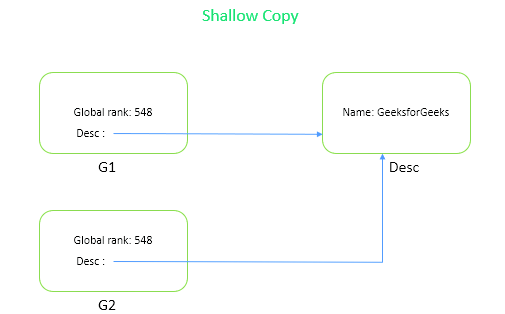
Note: In the above diagram The Global Rank is value type field so it creates the copy of that and store it in different location but the Name (Desc) is Reference type field so it’s pointing to the old or main memory location.

Example: Here, if you will change value type then it is working on c2 and c1, and not affected but in reference type any change will affect both c1 and c2.

// C# program to illustrate the 
// concept of Shallow Copy
using System;
      
class Example {
      
// Main Method
static void Main(string[] args)
{
      
    Company c1 = new Company(548, "GeeksforGeeks",
                                  "Sandeep Jain");
      
    // Performing Shallow copy                      
    Company c2 = (Company)c1.Shallowcopy(); 
  
    Console.WriteLine("Before Changing: ");
      
    // Before changing the value of
    // c2 GBRank and CompanyName
    Console.WriteLine(c1.GBRank);
    Console.WriteLine(c2.GBRank);
    Console.WriteLine(c2.desc.CompanyName);
    Console.WriteLine(c1.desc.CompanyName);
  
    // changing the value of c2 GBRank
    // and CompanyName
    c2.GBRank = 59;
    c2.desc.CompanyName = "GFG";
  
    Console.WriteLine("\nAfter Changing: ");
      
    // After changing the value of 
    // c2 GBRank and CompanyName
    Console.WriteLine(c1.GBRank);
    Console.WriteLine(c2.GBRank);
    Console.WriteLine(c2.desc.CompanyName);
    Console.WriteLine(c1.desc.CompanyName);
}
}
  
  
class Company 
{
          
    public int GBRank;
    public CompanyDescription desc;
      
    public Company(int gbRank, string c,
                               string o)
    {
        this.GBRank = gbRank;
        desc = new CompanyDescription(c, o);
    }
      
    // method for cloning object
    public object Shallowcopy()
    {
        return this.MemberwiseClone();
    }
      
    // method for cloning object
    public Company DeepCopy()
    {
        Company deepcopyCompany = new Company(this.GBRank,
                            desc.CompanyName, desc.Owner);
        return deepcopyCompany;
    }
}
      
      
class CompanyDescription 
{
      
    public string CompanyName;
    public string Owner;
    public CompanyDescription(string c, string o)
    {
        this.CompanyName = c;
        this.Owner = o;
    }
}
Output:
Before Changing: 
548
548
GeeksforGeeks
GeeksforGeeks

After Changing: 
548
59
GFG
GFG

Deep Copy: It is a process of creating a new object and then copying the fields of the current object to the newly created object to make a complete copy of the internal reference types. If the specified field is a value type, then a bit-by-bit copy of the field will be performed. If the specified field is a reference type, then a new copy of the referred object is performed.

Note:In the above diagram The Global Rank is value type field so it creates the copy of that and store it in different location. The Name(Desc) is Reference type field so in Deep Copy there is a clone of reference type field which also will be stored in a different location.

Example: Here, the field type does not matter whether it is value type or reference type. Deep copy makes a copy of whole data and store it in a different memory location so if we change c2, c1 will not affected vice versa also.

// C# program to demonstrate the
// concept of Deep copy
using System;
  
namespace ShallowVSDeepCopy {
      
class Program {
      
    // Main Method
    static void Main(string[] args)
    {
        Company c1 = new Company(548, "GeeksforGeeks",
                                      "Sandeep Jain");
        // Performing Deep copy                             
        Company c2 = (Company)c1.DeepCopy(); 
  
        Console.WriteLine("Before Changing: ");
           
        // Before changing the value of 
        // c2 GBRank and CompanyName
        Console.WriteLine(c1.GBRank);
        Console.WriteLine(c2.GBRank);
        Console.WriteLine(c2.desc.CompanyName);
        Console.WriteLine(c1.desc.CompanyName);
  
        Console.WriteLine("\nAfter Changing: ");
          
        // changing the value of c2 
        // GBRank and CompanyName
        c2.GBRank = 59;
        c2.desc.CompanyName = "GFG";
  
        // After changing the value of
        // c2 GBRank and CompanyName
        Console.WriteLine(c1.GBRank);
        Console.WriteLine(c2.GBRank);
        Console.WriteLine(c2.desc.CompanyName);
        Console.WriteLine(c1.desc.CompanyName);
    }
}
  
class Company {
      
    public int GBRank;
    public CompanyDescription desc;
  
    public Company(int gbRank, string c, 
                               string o)
    {
        this.GBRank = gbRank;
        desc = new CompanyDescription(c, o);
    }
      
    // method for cloning object
    public object Shallowcopy()
    {
        return this.MemberwiseClone();
    }
      
    // method for cloning object
    public Company DeepCopy()
    {
        Company deepcopyCompany = new Company(this.GBRank,
                           desc.CompanyName, desc.Owner);
                             
        return deepcopyCompany;
    }
}
  
class CompanyDescription {
      
    public string CompanyName;
    public string Owner;
    public CompanyDescription(string c, 
                             string o)
    {
        this.CompanyName = c;
        this.Owner = o;
    }
}
}
Output:
Before Changing: 
548
548
GeeksforGeeks
GeeksforGeeks

After Changing: 
548
59
GFG
GeeksforGeeks

Table Variable in SQL Server

 Table variable is a type of local variable that used to store data temporarily, similar to the temp table in SQL Server. Tempdb database is used to store table variables.

To declare a table variable, start the DECLARE statement. The name of table variable must start with at(@) sign. The TABLE keyword defines that used variable is a table variable. After the TABLE keyword, define column names and datatypes of the table variable in SQL Server.

Syntax :

DECLARE @TABLEVARIABLE TABLE
(column1 datatype,  
column2 datatype,  
columnN datatype
)

Example-1 :
DECLARE @WeekDays TABLE (Number INT, Day VARCHAR(40), Name VARCHAR(40))

INSERT INTO @WeekDays
VALUES

(1, 'Mon', 'Monday'),
(2, 'Tue', 'Tuesday'),
(3, 'Wed', 'Wednesday'),
(4, 'Thu', 'Thursday'),
(5, 'Fri', 'Friday'),
(6, 'Sat', 'Saturday'),
(7, 'Sun', 'Sunday')

SELECT * FROM @WeekDays;

NumberDayName
1MonMonday
2TueTuesday
3WedWednesday
4ThuThursday
5FriFriday
6SatSaturday
7SunSunday

Update and delete statement usage for table variable in SQL Server

Here we will update and delete the data in the table variables.

Example-2 :

DELETE @WeekDays WHERE Number=7;

UPDATE @WeekDays SET Name='Saturday is a holiday' WHERE Number=6 ;
SELECT * FROM @WeekDays;
NumberDayName
1MonMonday
2TueTuesday
3WedWednesday
4ThuThursday
5FriFriday
6SatSaturday is a holiday

Temporary Tables in SQL Server


Introduction

Temporary tables in SQL Server also known as temp tables are used by database developers and DBAs to store data temporarily and work on this data for faster performance. In this article, we will learn what temporary tables are in SQL Server, different temporary table types, and how to work with temp tables using SQL.

Temporary Tables in SQL Server 

Temporary tables provide temporary data storage in exact form of original tables for quick access of data. Temporary tables are stored in TempDB. They work like a regular table in that you can perform the operations select, insert and delete as for a regular table. If created inside a stored procedure, they are destroyed upon completion of the stored procedure.

Let's have a look at a practical example of how to create and use temporary tables in SQL Server. The example is developed in SQL Server using the SQL Server Management Studio.

What are types of temporary tables in SQL Server?

There are two types of temporary tables; one is local and the other is global.

Local Temporary Tables

Local temporary tables are the tables stored in tempdb. Local temporary tables are temporary tables that are available only to the session that created them. These tables are automatically destroyed at the termination of the procedure or session. They are specified with the prefix #, for example, #table_name, and these temp tables can be created with the same name in multiple windows.

Creating a local temporary table

create table #table_name
(
column_name varchar(20),
column_no int
)
SQL

Create-Local-Temporary-Tables-in-sqlserver.jpg

Global Temporary Tables

Global temporary tables are also stored in tempdb. Global temporary tables are temporary tables that are available to all sessions and all users. They have dropped automatically when the last session using the temporary table has been completed. They are specified with the prefix #, for example, ##table_name.

Creating Global Temporary Table

create table ##GlobalTemporaryTable
(
column_name varchar(20),
column_no int
)
SQL


Both tables are stored in the tempdb system database.

Where is the temporary table stored in SQL Server?

Temporary tables are stored inside the Temporary Folder of TempDB. Whenever we create a temporary table, it goes to the Temporary folder of the tempdb database. tempdb -> temporary tables.

Temporary Tables vs Regular Table in SQL Server 

What is the difference between a temp table and a regular table? 

Difference between Temporary Tables VS Regular Table

A Temporary table differs in the following two ways from regular tables:

  1. Each temporary table is implicitly dropped by the system.
  2. Each temporary table is stored in the tempdb system database. The table variable doesn't.

How to Drop Temporary Tables in SQL Server?

We can use the DROP SQL statement to drop a temp table. 

Drop Temporary Tables

We can delete the temporary tables using a DROP TABLE command as follows.

DROP TABLE #temporaryTable
Print 'Deleted table'
SQL

Output


Drop Multiple Temporary Tables

You can drop a single Temporary Table or multiple Temporary Tables at a time.

Syntax

DROP TABLE #table_name1,#table_name2
SQL

When to use a Temporary Tables in SQL Server?

A temporary table is used to store data within a session from multiple tables using complex queries and where you need data manipulation on the server side before the data can be returned. For example, if you need to select data from multiple tables, apply a business logic on some columns, also the selection can be changed based on the calculated results. Once you are done with this temp data, the table is dropped form the server. There is no permanent storage of temp tables.

Another example is, if you have a store proc that involves data manipulation using complex SQL queries.


Difference between a temp table and a table variable?

Table variables in SQL are local variables that are created using a DECLARE statement and are assigned values using a SET or SELECT statement. The variables exist in the TempDB with their value as long as their scope exist but once they are out of scope, they are dropped. 

Recent Post

how to control duplicate order